For restaurants, retail & any business that runs on shifts

Stop dreading
Sunday night scheduling.

ShiftReady builds next week's schedule in seconds — balanced, fair, and respecting everyone's availability, qualifications and hour limits. You review it and hit publish.

Free plan, forever. Paid plans start with 30 days free. No contracts, cancel anytime.

Secondsto build a full week
Per locationnever per employee
$0to start, and stay
30 daysfree on paid plans

Your scheduling process is costing more than you think.

Every week you're cross-referencing availability texts, remembering who called out last time, working out who can train the new hire, and hoping nobody quits before Friday. That's two to four hours — every single week — for a job that should take minutes.

And when it's done, someone still asks why they got Tuesday instead of Saturday.

This is what a generated week looks like

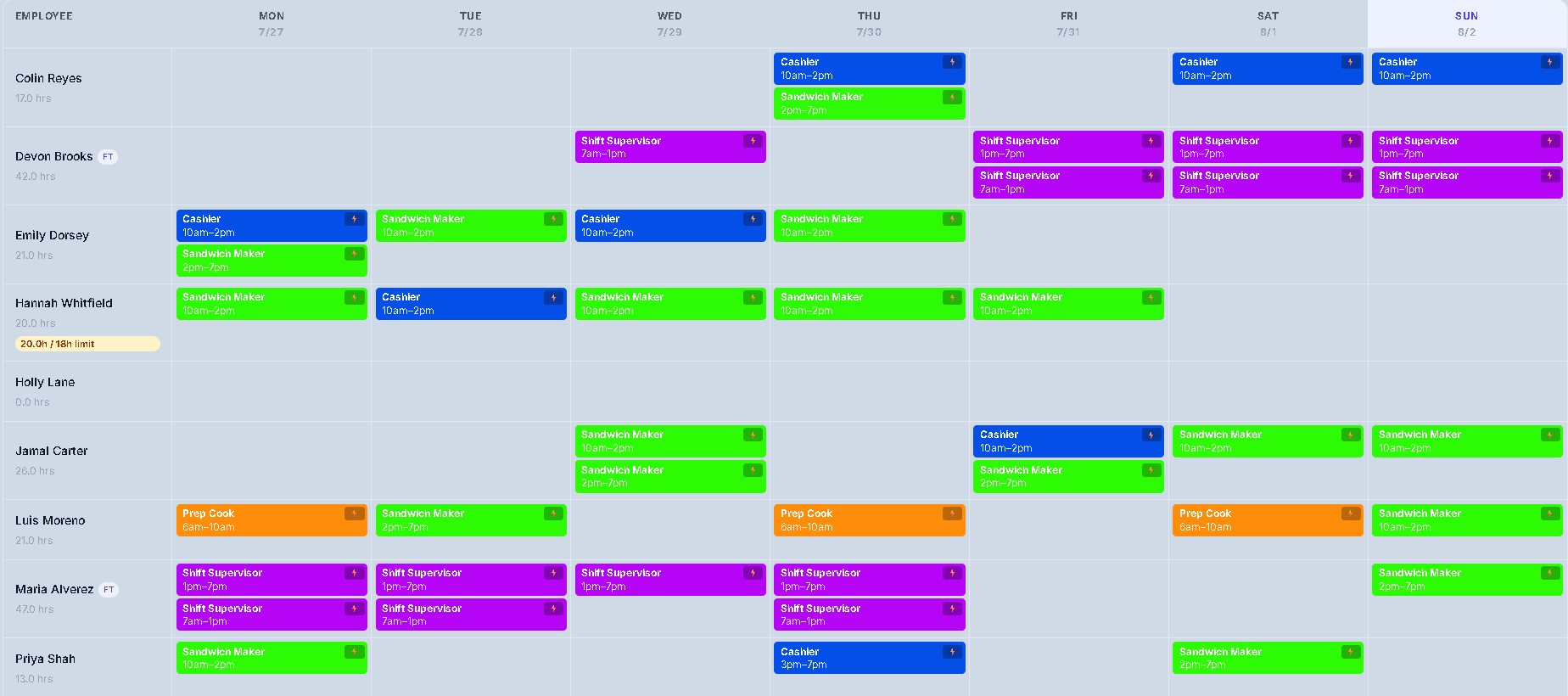
Not a mock-up. This is the actual screen, from a real schedule, built in one click.

A full week of shifts in ShiftReady, colour-coded by position, with weekly labor cost and scheduling flags

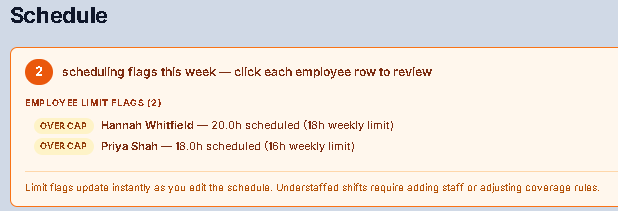
Nine people, four positions, a full week — colour-coded so you can see the gaps at a glance. Hannah's amber tag is the app flagging that she's over her agreed hours.

It tells you before you publish, not after

Every schedule is checked as it's built. If someone's heading past the hours they agreed to, or a shift is short of the cover you said you need, you see it while there's still time to do something about it.

The flags update live as you drag shifts around, so you can fix one and watch the warning disappear.

ShiftReady flagging two employees scheduled over their agreed weekly hour limits

Set it up once. Then it's one button.

Most of the work happens the first week. After that, scheduling is a click and a review.

1

Tell it how you staff

Your opening hours, your positions, and how many people you need on each one at different times of day.

2

Add your team — they do the rest

Send an invite and each person fills in their own availability, phone number and days they'd rather not work. You mark who's qualified for what.

3

Hit Generate

A full, balanced week appears in seconds — with flags if anyone's over their hours or a shift is short-staffed.

4

Publish, and everyone knows

Staff see their shifts on their phone. No printouts, no group text, no "I didn't know I was on."

Everything you need. Nothing you don't.

One product, whether you're scheduling nine people or a hundred and nine.

⚖️

Intelligent shift balancing

Doesn't just fill slots — balances them. Looks beyond the current week so hours even out over time, and weighs who wants more hours, who wants fewer, and who asked for which days off. When coverage makes that impossible, it picks whoever is least affected and tells you — rather than quietly putting someone over their hours.

🎓

Knows who can do what

Only schedules people for jobs they're signed off on. Trainees get paired with a trainer, and you set how many trainees one person can cover.

🚨

Call-outs and coverage

An employee who can't make a shift says so in the app. You approve it, the shift is flagged, and one tap texts everyone eligible. First to reply YES gets it, and the schedule updates itself.

🔄

Shift swaps that can't double-book

Staff arrange swaps between themselves and you approve. Anyone already working those hours simply isn't offered — so a swap can never put someone in two places at once.

📅

Time off without the paper trail

Requests come to you with the dates and the reason. Approve one and the schedule frees the shift immediately. Far-out requests can auto-approve so you're not rubber-stamping January in July.

⏱️

Clock in, clock out, timesheets

Staff clock in on a shared tablet or their own phone. Hours roll into timesheets you can check against the shifts you scheduled, so payroll stops being a Sunday-night puzzle too. CSV export for payroll on Growth and up.

⚠️

Warnings before you publish

Flags anyone heading into overtime or past their agreed hours, and any shift that's short of the cover you said you need — while there's still time to fix it.

📖

A record of who did what

Every time-off request, approval, denial and change is recorded automatically — who did it, what changed and when. Tamper-proof, so if there's ever a dispute the answer isn't someone's memory.

When someone can't make it

Somebody's car breaks down at four in the afternoon. Here's the whole of what happens.

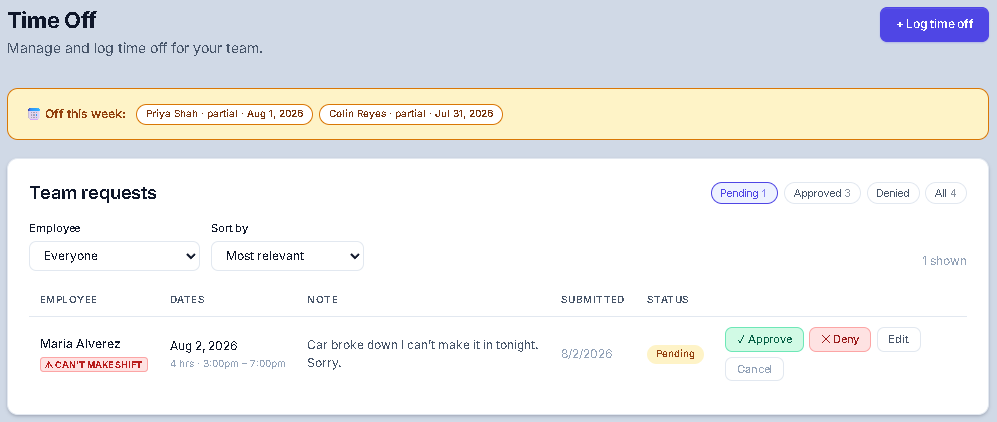
A manager's view of a pending call-out from an employee who cannot make their shift

1. They tell you in the app. It arrives flagged as a call-out, with the reason, sitting at the top of your list — not as a voicemail you find later.

2. You approve it and find cover

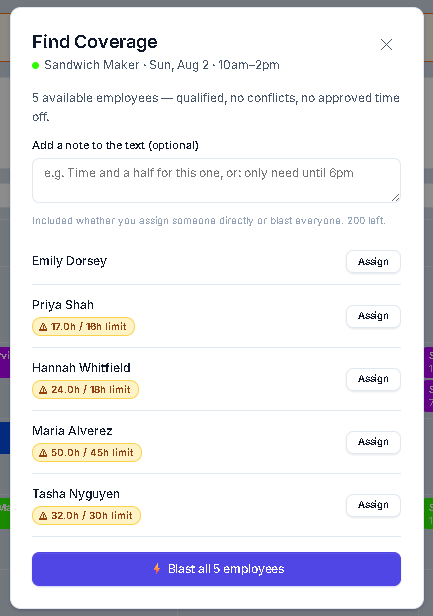
ShiftReady shows only the people who could actually work it — qualified for the position, not already on that day, and not on approved time off.

Anyone the shift would push past their agreed hours is tagged, so you can still pick them if you need to, knowing what it costs.

Assign someone directly, or text everyone eligible at once and let the first to reply take it. Either way the schedule updates itself and the gap closes.

ShiftReady showing which employees are available to cover a shift, with overtime warnings
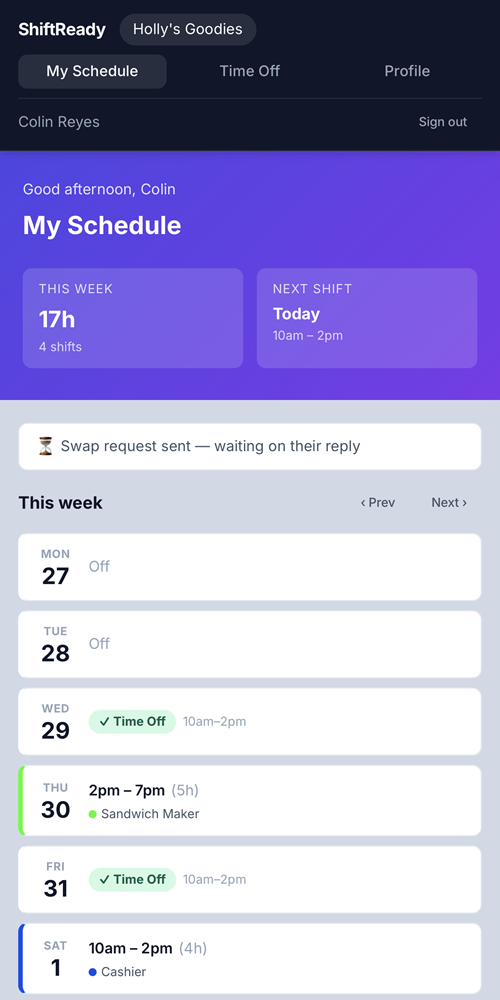
The ShiftReady employee view on a phone, showing this week's shifts and hours

Your team just sees their shifts

No printout on the wall, no group text, no "I didn't know I was on." Staff open ShiftReady on their phone and see this week, next week, and how many hours they're getting.

From the same screen they can ask for time off, propose a swap with a co-worker, or tell you they can't make a shift — so it reaches you as a record instead of a voicemail.

There's nothing to install. It's a web page that works like an app.

No more "why does she always get the good shifts?"

Scheduling arguments are rarely about the schedule. They're about fairness — real or perceived.

ShiftReady applies the same rules to everyone, every time. It weighs how much people have actually worked, not just this week but over time, so a light week now gets balanced out later. It takes account of what each person asked for — more hours, fewer hours, certain days off.

Requests are weighed, not guaranteed. Some weeks the coverage simply has to be filled. When that happens ShiftReady chooses whoever is least affected, and flags it before you publish — so you know who got the short straw and can have that conversation yourself, instead of finding out on Saturday.

When somebody asks why they got Tuesday instead of Saturday, there's an answer that isn't "because I said so."

Priced per location. Never per employee.

Hire a tenth person and your bill doesn't move. Most schedulers charge for every head — which means growing costs you more before it earns you more.

Free

$0
1 location · up to 10 employees
  • Automatic schedule generation
  • Time tracking & timesheets
  • Time-off management
  • Shift swap management
  • Employee self-onboarding
Start free

Growth

$34.99
per location / month · $44.99 founding rate
Everything in Free, plus:
  • Up to 50 employees per location
  • Call-out coverage by text
  • Payroll CSV export
  • Labor compliance alerts
  • Coverage violation flags
Start 30 days free
Best value

Pro

$54.99
per location / month · $69.99 founding rate
Everything in Growth, plus:
  • Unlimited employees per location
  • Multi-location dashboard
  • Advanced reporting
  • Priority support
Start 30 days free

Save 20% paying annually — Growth $27.99 and Pro $43.99 per location per month. Founding rates are locked in for as long as you stay subscribed.

You change plan twice. Not every time you hire.

Most schedulers bill for every head on the roster, every month. Ours has three tiers and two thresholds — and that's the whole of it.

To be straight about it: headcount does decide your plan. Free covers one location and up to ten people. Growth covers up to fifty per location. Pro is unlimited. So a growing business does move up — twice, at ten and at fifty.

The difference is what happens in between. Hire your eleventh, your thirtieth, your forty-ninth — the bill doesn't move. Take on six seasonal staff for the holidays and let them go in January — the bill doesn't move. Under per-employee pricing every one of those is a line-item, permanently.

And once you're on Pro, one location is one price no matter how many people work there. Sixty staff on a single site is $54.99 a month — that's the bill, not the starting point. Put your current headcount against whatever you're paying now and the comparison makes itself.

The scheduling engine is the same on every plan, including free. The fairness rules, the qualification checks, the hour limits, the flags before you publish — a nine-person café gets exactly what a sixty-person store gets. The paid tiers add coverage texts, payroll export and multi-location tools. They don't unlock a better scheduler, because there isn't a worse one.
Why I built this

I've always wanted to build something that was genuinely worth what I charged for it. Not a product I'd have to talk someone into. Not one where I'd find myself hoping they didn't read too closely, or didn't ask what happens at renewal.

Something where I could take the money with a clear conscience, because the person paying got more out of it than they put in. That's the only kind of business worth running, and honestly it's the only kind I'd be any good at.

So that's the bar ShiftReady is held to. Pricing that doesn't punish you for growing. A free plan that stays free. No contract, no setup fee, nothing buried in the terms that costs you later.

There's no catch to hide, because we didn't build one in.

— Jeremy Lane, Fastlane Technical Solutions LLC

Get next week's schedule done tonight.

Start on the free plan, add your team, and generate a real schedule. If it doesn't save you the evening, you've lost nothing.

Start free — no card needed

Got a question first? Email support@shiftreadyhq.com — it comes straight to me.