SMS Program & Opt-In Disclosure
Fastlane Technical Solutions LLC · Fargo, ND, USA · Last updated 6 August 2026
This page exists so anyone — including carriers and message reviewers — can see exactly how ShiftReady collects consent to send text messages, without needing an account. The opt-in itself happens inside a private, invitation-only account setup flow, so the wording and workflow are reproduced in full below.
In one sentence: ShiftReady only ever texts a number whose owner has personally agreed to it — either by typing it in themselves under the disclosure shown below, or by replying YES to a single confirmation request. An employer cannot consent on an employee's behalf.
What ShiftReady is
ShiftReady is employee shift-scheduling software made by Fastlane Technical Solutions LLC. Small businesses — restaurants, cafés, retail shops and similar — use it to build staff schedules, track availability and time off, record clock-in and clock-out times, and tell their own staff about shift changes.
Who sends, who receives, and why
| Who sends the messages | ShiftReady (Fastlane Technical Solutions LLC), on behalf of a business that subscribes to ShiftReady. |
|---|---|
| Who receives them | Employees of that subscribing business, who have an account in ShiftReady and have provided their own mobile number. |
| Why they are sent | To alert an employee that a shift needs coverage — either asking them directly or opening it to be claimed first-come, first-served — and to tell a manager when an employee can't work a shift or has cancelled approved time off. |
| What is never sent | No marketing, no promotions, no advertising, no third-party content. Phone numbers are never sold, rented or shared for marketing. |
How employees opt in
Path 1 — the employee enters their own number (primary)
An employer invites an employee by sending them a private invitation link. Opening that link starts account setup. On the first screen the employee enters their own name and mobile number. The mobile number field is accompanied by this consent wording, shown on screen at the moment the number is entered:
The employee must enter a valid mobile number to continue. There is no pre-checked box and no consent is assumed: the act of typing the number under this disclosure is the consent. The date and time are recorded against that employee's record.
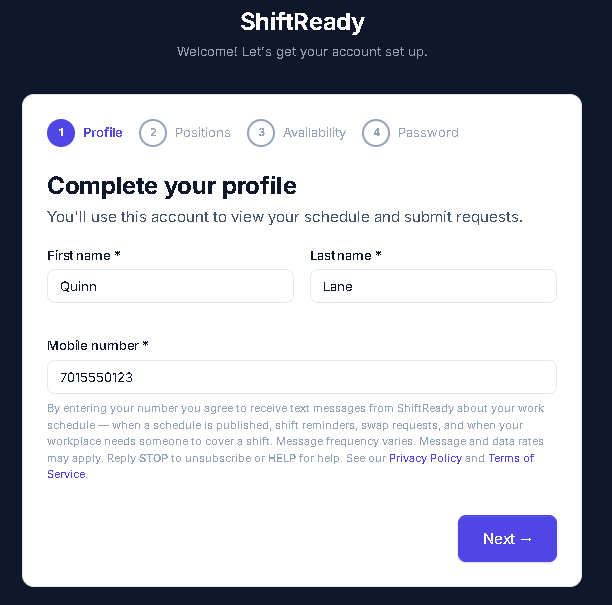
Live screenshot: the account-setup screen an invited employee sees. The consent wording shown above the "Next" button is exactly what's quoted in this section.
Path 2 — the employer enters the number, and the employee must confirm by text
An owner or manager may enter an employee's mobile number when setting up that employee's record, exactly as they would in any staff directory. Entering a number this way does not switch text messages on. The employer cannot consent on the employee's behalf.
When a number is entered by anyone other than its owner, ShiftReady sends that number one message and one message only:
Until that person replies YES, no other message of any kind is sent to that number — not schedule notifications, not coverage requests, nothing. The reply is recorded with a timestamp against their record, and that reply is the consent. If they never answer, no further message is ever sent; ShiftReady does not re-ask on a timer. A manager may request confirmation again by hand, at most once an hour, and cannot do so at all once somebody has replied STOP.
This confirmation requirement is enforced in the database rather than in screen logic, so it applies to every notification the product can send, by every route.
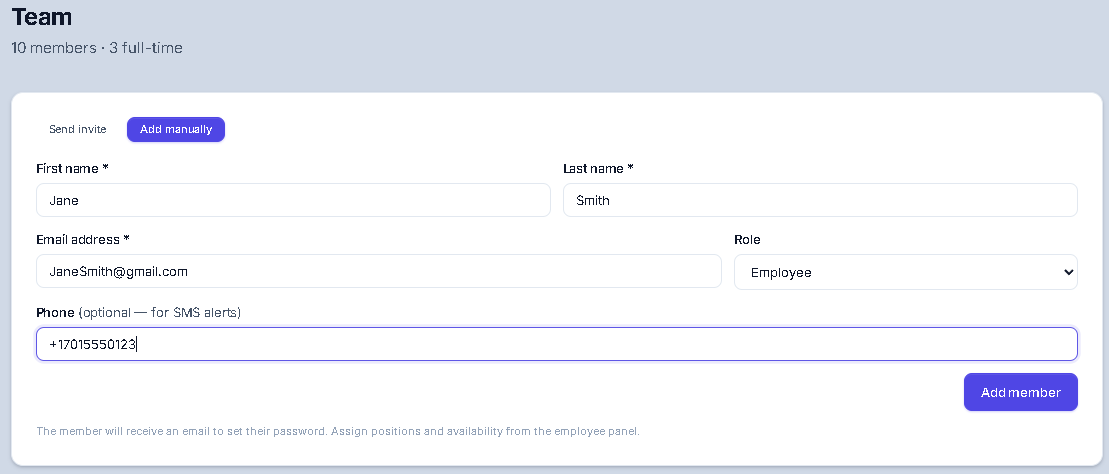
Live screenshot: a manager adding a staff record by hand. The phone field is optional and clearly labeled — entering it here only queues the one-time confirmation text shown above; it does not turn messages on by itself.
There is no other opt-in path
There is no public sign-up form for text messages. No numbers are purchased, rented, imported from third parties, or gathered from any list. A number can only enter ShiftReady through an employer's own staff records.
Example messages
Message frequency
Frequency varies with how often an employee's workplace publishes schedules and how often shifts change. A typical employee receives a few messages per week. Message and data rates may apply.
How to opt out, and how to get help
| Turn messages on | Reply YES to the confirmation request. Also accepted: Y, START, CONFIRM. |
|---|---|
| Stop messages | Reply STOP to any message. Also accepted: CANCEL, QUIT, UNSUBSCRIBE, OPTOUT, STOPALL, REVOKE, END. |
| Confirmation | “You have successfully been unsubscribed. You will not receive any more messages from this number. Reply START to resubscribe.” |
| Get help | Reply HELP or INFO, or email the address below. |
| Resume messages | Reply START. |
| Other ways to stop | Remove the mobile number from the Profile page inside ShiftReady, or ask the employer to remove it. |
Stopping text messages does not affect the employee's ability to use ShiftReady in a web browser. They simply stop being notified by text.